
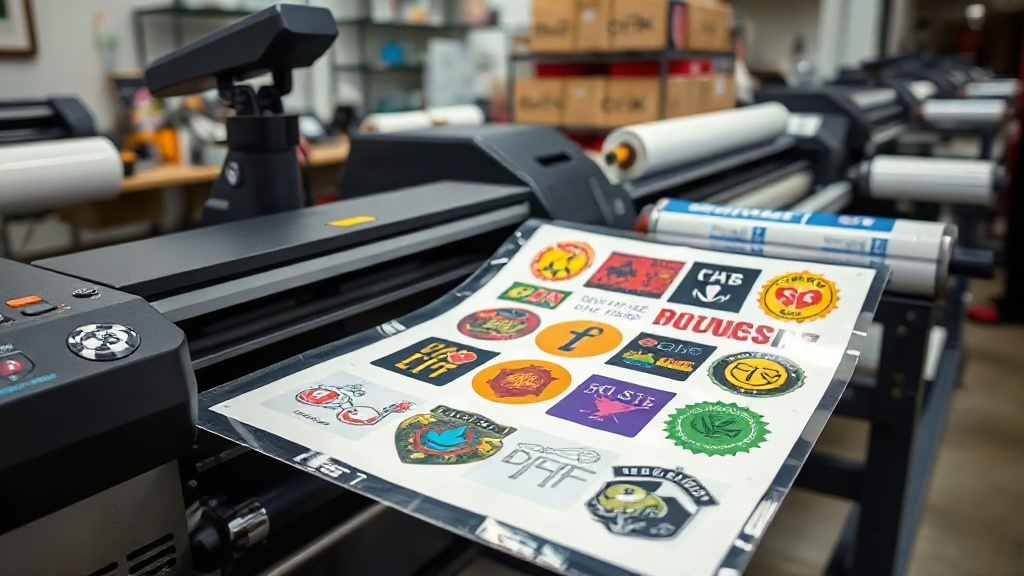
If you're in the custom apparel business, you've likely heard about DTF printing. It's a game-changer for transferring vibrant designs onto fabrics. But did you know that you can supercharge your productivity with a DTF gangsheet? In this guide, we'll dive deep into what a DTF gangsheet is, why it's essential for your shop, and how to create and use one effectively. Whether you're a seasoned pro or just starting out, mastering the DTF gangsheet will save you time, reduce waste, and increase your profits.
What is a DTF Gangsheet?
A DTF gangsheet is a single sheet of DTF transfer film that contains multiple designs arranged together. Instead of printing one design at a time, you gang up several designs onto one sheet, hence the name. This method maximizes the use of your film and ink, and it's especially useful when you have many small orders or need to produce a variety of designs quickly.
Why Use a DTF Gangsheet?
There are several compelling reasons to adopt DTF gangsheets in your production process:
- Time Efficiency: Printing multiple designs in one pass reduces the number of print jobs, saving you hours of manual labor.
- Cost Savings: By optimizing the layout, you use less film and ink, cutting down your material costs.
- Consistency: All designs on the sheet go through the same curing and pressing conditions, ensuring consistent quality.
- Versatility: You can mix and match different sizes and designs on one sheet, perfect for sample packs or varied orders.
How to Create a DTF Gangsheet
Creating a DTF gangsheet involves a few key steps, from preparing your artwork to printing and curing. Let's break it down.
1. Prepare Your Artwork
Start by collecting all the designs you want to include. Ensure each design is in a high-resolution format, preferably PNG with transparent background, and in CMYK color mode. Adjust the size of each design according to your needs. Remember to mirror the images if your printer requires it (most DTF printers print mirrored).
2. Choose the Right Software
You'll need a layout software to arrange your designs efficiently. Popular options include Adobe Photoshop, Illustrator, or dedicated RIP software like Cadlink or AcroRIP. These tools allow you to nest designs closely, minimizing wasted space. Some software even has auto-nesting features that optimize the layout for you.
3. Set Up the Sheet
Determine the size of your DTF film. Common widths are 13", 17", and 24", but you can use any size that fits your printer. Create a new document in your software with the same dimensions as your film. Then, import your designs and arrange them on the canvas. Leave a small gap (about 0.25 inches) between designs to make cutting easier and prevent ink bleeding.
4. Print and Powder
Load your DTF printer with the film and print your gangsheet. Immediately after printing, while the ink is still wet, apply hot melt adhesive powder evenly over the sheet. Shake off excess powder, then cure the sheet in an oven or with a heat press. Follow the manufacturer's recommended temperature and time for curing.
5. Press and Enjoy
Once cured, your DTF gangsheet is ready to use. Cut out each design and press it onto your garment using a heat press. The adhesive powder melts and bonds the design to the fabric, creating a durable, vibrant transfer.
Tips for Optimizing Your DTF Gangsheet
To get the most out of your DTF gangsheets, consider these expert tips:
- Nest Smartly: Rotate designs to fill gaps. Use software tools to automatically nest irregular shapes.
- Group Similar Colors: If your printer allows, group designs with similar color profiles to reduce ink changes and improve efficiency.
- Test Print: Before committing to a full sheet, do a small test print to check color accuracy and alignment.
- Keep Records: Note the settings that work best for different fabrics and designs. This will save time in the future.
- Use Quality Materials: Invest in good DTF film and powder. Cheap materials can lead to poor adhesion and faded colors.
Common Mistakes to Avoid
Even experienced printers can make mistakes with DTF gangsheets. Here are some pitfalls to watch out for:
- Overcrowding: Packing too many designs can cause ink smudging and difficulty in cutting. Leave enough space.
- Incorrect Mirroring: Forgetting to mirror images results in backwards prints. Always double-check.
- Insufficient Powdering: Not applying enough powder leads to poor adhesion. Ensure even coverage.
- Improper Curing: Under-curing causes the design to wash off; over-curing makes it brittle. Follow the guidelines.
- Ignoring Printer Maintenance: Regular cleaning and maintenance keep your printer in top shape and prevent clogs.
Frequently Asked Questions
What is the difference between DTF and DTG printing?
DTF (Direct to Film) involves printing onto a film, powdering, and then transferring to fabric, while DTG (Direct to Garment) prints directly onto the garment. DTF works on more fabric types, including cotton, polyester, and blends, and often produces more vibrant colors.
Can I use a DTF gangsheet on dark garments?
Yes, DTF printing works on both light and dark garments. The white ink layer in DTF transfers provides a base that makes colors pop on dark fabrics. However, you may need to adjust your color profiles for best results.
How do I store unused DTF gangsheets?
Store unused DTF gangsheets in a cool, dry place, away from direct sunlight. Keep them in a sealed bag or container to prevent dust and moisture from affecting the adhesive. Properly stored, they can last for several months.
What is the best powder for DTF printing?
Use a high-quality hot melt adhesive powder specifically designed for DTF printing. Particle size typically ranges from 80 to 200 microns. Finer powders (80-100 microns) are better for fine details, while coarser powders (150-200 microns) provide stronger adhesion for larger designs.
How do I prevent colors from fading after washing?
To ensure longevity, press the transfer at the correct temperature and pressure, and wash the garment inside out in cold water. Avoid using bleach or fabric softeners, and tumble dry on low or hang dry. Proper curing and quality materials are key to wash durability.
Mastering the DTF gangsheet is a skill that pays off. By following the steps and tips outlined here, you'll be able to produce high-quality transfers efficiently, impressing your customers and growing your business. So fire up your printer and start ganging those sheets!